Live Sound Glossary: Terms Every Band Member Should Know


On this page
Quick jump: Amp · Aux Send · Bleed · Channel · Clipping · DI Box · Feedback · FOH · Gain · Ground Loop · Impedance · Input List · Monitor · PA System · Phantom Power · Signal Chain · Stage Plot
Why Learn the Lingo
Sound engineers speak a shorthand that can sound like a foreign language when you’re loading in at a new venue. Knowing the basic terms makes you faster to work with during setup, helps you ask for what you need in plain terms, and usually leads to a better-sounding show for you and the audience. The terms below are grouped into three clusters (Signal Path, The Mix, and The Stage) and listed alphabetically within each.
 Via violetrecording.com
Signal Path: How Sound Gets From You to the Speakers
Clipping Clipping is the harsh, crunchy distortion you hear when a signal is pushed louder than a piece of equipment can handle. The tops of the sound wave get “clipped” off, and the result sounds broken rather than loud. At a show: You’ll hear an engineer say “you’re clipping” if you sing or play much harder than you did at soundcheck.
DI Box A DI (Direct Inject) box is a small box that converts the signal from an instrument like a keyboard, acoustic guitar, or bass into a form the mixing desk can use cleanly over long cables. It lets the engineer plug your instrument straight into the sound system without putting a microphone in front of it. At a show: Keyboard players and bassists are often asked “Do you have your own DI, or do you need one?”
Gain Gain is the first volume control a signal meets when it enters the mixing desk, and it sets how strong your signal is before anything else happens to it. Set too low, your sound is weak and noisy; set too high, it distorts. Good engineers set it so the signal is strong without clipping, leaving a little extra room (called headroom) in case you play louder later. At a show: During soundcheck the engineer will ask you to play or sing “as loud as you will during the show” so they can set your gain.
Ground Loop A ground loop is a wiring problem in which equipment is connected to electrical ground through more than one path. The result is a steady hum or buzz coming through the speakers, often tracing back to either a power connection or an audio cable. At a show: If the speakers buzz even when nobody is playing, the engineer may start unplugging things one at a time to hunt down a ground issue.
Impedance Impedance describes how much a piece of equipment resists the electrical signal flowing into it. You mostly need to know that some outputs and inputs are designed to work together and others aren’t, and a mismatch can make your sound thin, quiet, or noisy. DI boxes exist largely to solve this mismatch. At a show: You may see “high-Z” or “hi-Z” (Z is shorthand for impedance) printed next to an input meant for guitars.
Phantom Power Phantom power is a small electrical current (usually 48 volts) that the mixing desk sends back up a microphone cable to power certain mics and DI boxes. Condenser microphones, the sensitive type often used on acoustic instruments and overhead drums, need it to work at all. At a show: Look for a button labeled “48V” on the desk, and expect the engineer to switch it on before checking those mics.
Signal Chain The signal chain is the full route your sound travels, from your instrument or voice through every cable, pedal, box, and desk until it comes out of a speaker. Thinking in terms of the chain helps you find problems, because a missing sound has to be stuck at one specific link. At a show: When something isn’t working, an engineer will “follow the signal chain” from the stage to the desk to find the break.
The Mix: What the Engineer Controls
 Via hub.yamaha.com
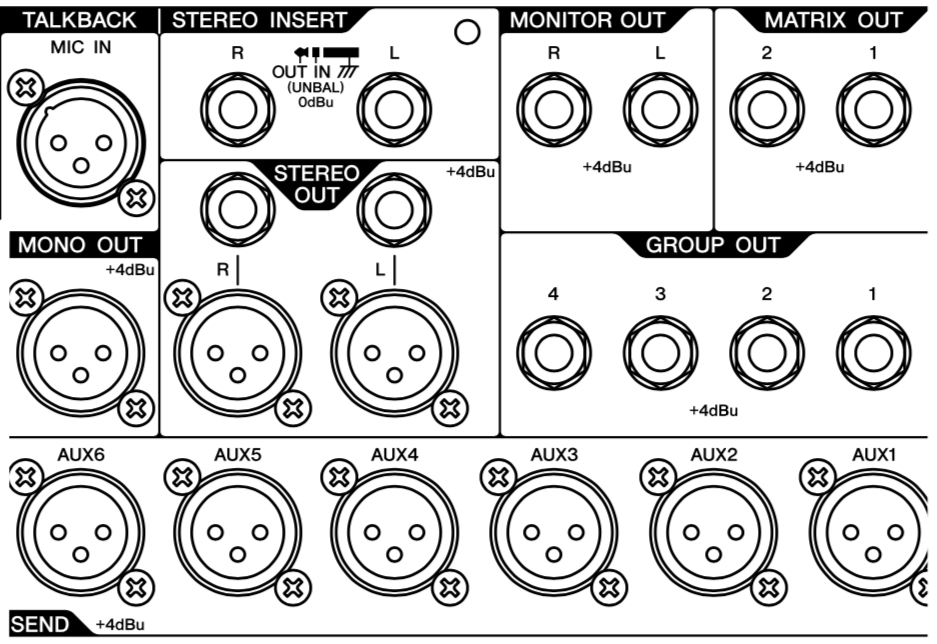
Aux Send An aux (auxiliary) send is a separate volume knob on each channel that sends a copy of that signal somewhere other than the main speakers, most often to a performer’s monitor. Each aux creates its own independent mix, so the drummer can hear lots of bass while the singer hears mostly vocals. For monitors, these are usually set “pre-fader,” meaning the monitor mix isn’t affected when the engineer moves the main volume slider. At a show: When you ask for “more keys in my wedge,” the engineer turns up the keyboard channel’s aux send for your monitor.
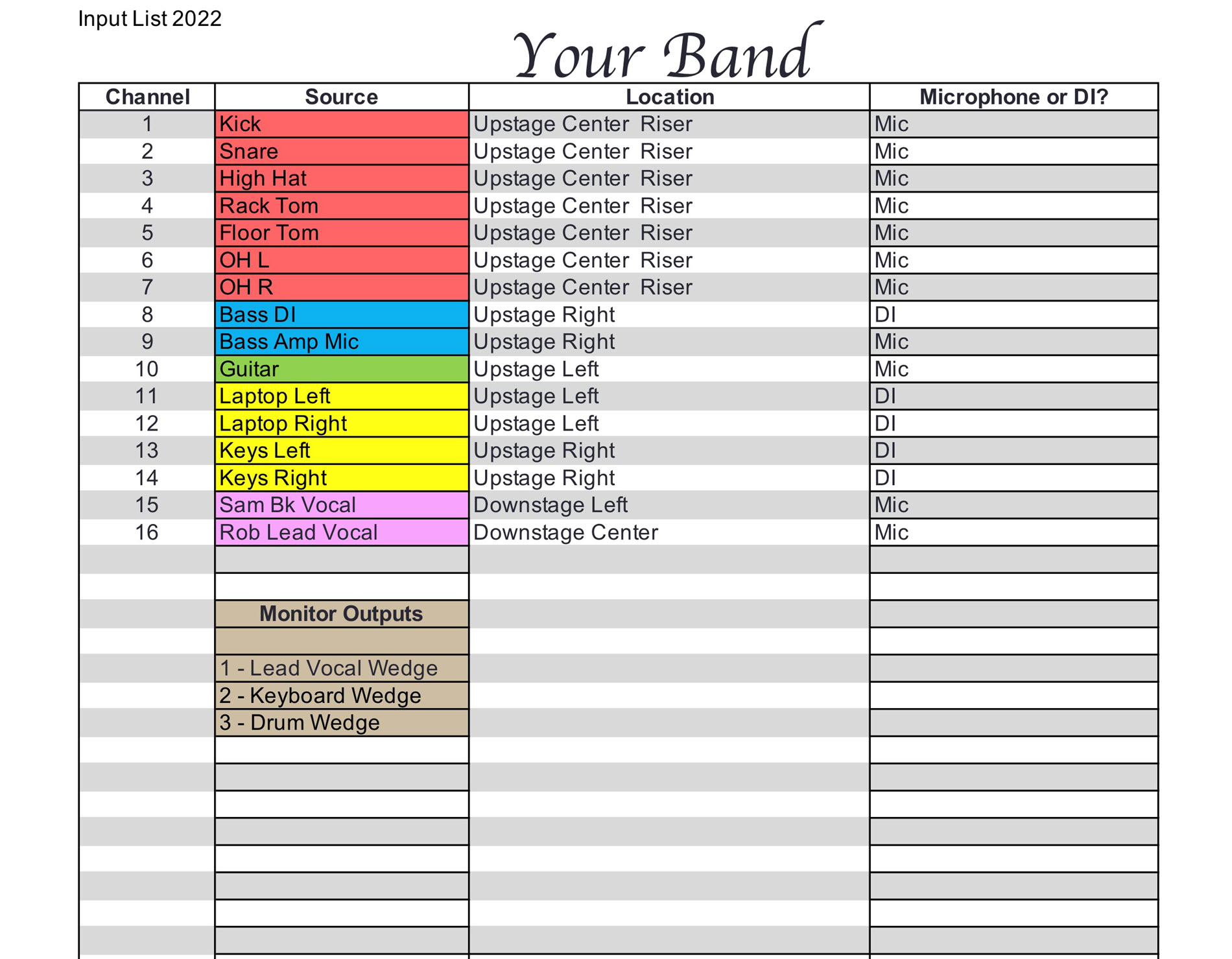
Channel A channel is one strip of controls on the mixing desk dedicated to a single sound source, such as the kick drum, the lead vocal, or the bass DI. Each channel has its own gain, tone controls, aux sends, and volume slider (called a fader). At a show: Your input list tells the engineer which instrument goes on which channel number.
Feedback Feedback is the loud squeal or ringing that happens when a microphone picks up sound from a speaker, sends it back through the system, and the loop keeps building on itself. It’s mostly preventable: keep mics behind the main speakers, hold vocal mics close, and keep monitors no louder than you need. At a show: Engineers “ring out” monitors before the show, deliberately finding and turning down the pitches most likely to feed back.
FOH (Front of House) Front of House refers to the main mix the audience hears, and also to the spot in the room where the engineer sits to control it. It’s usually out in the crowd so the engineer hears what the audience hears. At a show: “The FOH engineer” is the person running the audience mix, and “talk to FOH” means go to the mixing desk out front.
PA System PA stands for public address, and a PA system is the full set of equipment that makes sound loud enough for the room: microphones and instruments feed a mixer, which feeds amplifiers and speakers. A separate set of monitor mixes goes back to the performers on stage. At a show: A venue that says “PA provided” means you don’t need to bring your own speakers or mixer.
The Stage: Where You Work
Amp “Amp” is short for amplifier, a device that makes a signal strong enough to drive a speaker. Musicians usually mean their instrument amp (the guitar or bass amp behind them), while engineers may mean the power amps driving the main speakers. At a show: An engineer might ask you to “turn your amp down,” because a loud stage amp can drown out the mix the audience hears.
Bleed Bleed is sound from one source leaking into a microphone meant for something else, such as drums picked up by the vocal mic. A little is unavoidable, but too much makes the mix muddy and harder to control. At a show: Loud wedges and stage amps are common causes of bleed, which is why engineers ask bands to keep stage volume down.
Input List An input list is a simple table of every sound source on stage that needs to connect to the PA. It typically shows the instrument name, the channel number, and whether it uses a microphone or DI box, and can include stage location and monitor needs. Any spreadsheet works fine. At a show: Venues often request one in advance, and a house engineer unfamiliar with your band will rely on it.
 Via hub.yamaha.com
Monitor (Wedge) A monitor is a speaker pointed at the performers so they can hear themselves and each other. A “wedge” is the angled floor monitor that sits at the front of the stage facing back toward you; in-ear monitors are the earpiece alternative. Keep them as quiet as you can, since loud monitors cause bleed and feedback. At a show: You’ll be asked during soundcheck what you want “in your wedge.”
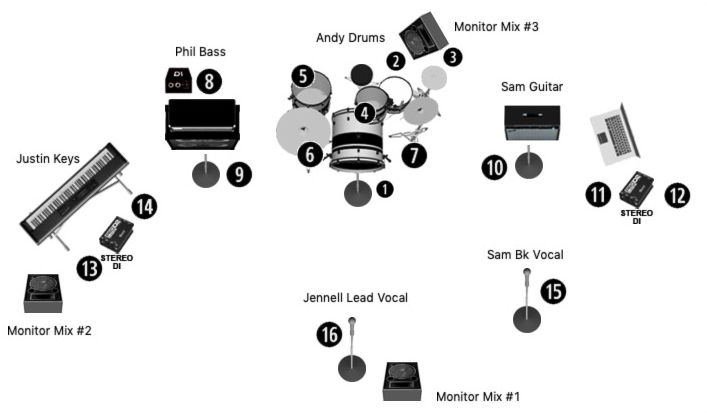
Stage Plot A stage plot is a drawing showing where every instrument, microphone, DI, and monitor sits on stage, ideally labeled with band members’ names and numbers matching the input list. A hand-drawn sketch works as well as fancy software. You may also see “downstage” (the edge nearest the audience) and “upstage” (the back, usually where the drummer sits). At a show: Engineers and stagehands use the stage plot to set up mics and monitors before you even walk in, which speeds up changeovers.
 Via hub.yamaha.com
Putting It to Use
You don’t need to memorize all of this before your next gig. Start with the two documents you control, the input list and stage plot, and learn to ask for monitor changes clearly. Engineers notice the bands that speak their language, and that goodwill tends to show up in the mix.
Sources
Live Sound Guide: PA Systems, Mixing and Monitors for Gigs, Violet Recording Editorial Team, Violet Recording
Tools of the Trade: Seven Ways to Ensure a Smooth Sound Check, Steve La Cerra, Yamaha Music (hub.yamaha.com)
Live Sound Troubleshooting Tips, Part 1, Steve La Cerra, Yamaha Music (hub.yamaha.com)