PA System Basics: What Every Band Member Should Know


On this page
Why the Signal Chain Is Worth Knowing
You don’t need to run the sound desk to benefit from understanding how a PA works. When you know where your signal goes after it leaves your instrument, you can explain what you need in a monitor, spot a likely problem before it derails soundcheck, and talk to the engineer in terms they recognize. This guide gives you that mental model, piece by piece.
 Via violetrecording.com
The Signal Chain: From Your Mouth to the Back of the Room
A PA (short for “public address”) system is the set of gear that makes voices and instruments loud enough for an audience to hear clearly. Violet Recording’s live sound guide notes that every PA follows the same basic path: microphones and instruments feed a mixer, the mixer feeds amplifiers and speakers, and separate monitor mixes go back to the performers. Here’s each link in that chain and why it’s there.
1. Microphones and instruments (the sources). Everything starts here. A microphone turns your voice, or the sound of a drum or guitar amp, into a small electrical signal. Electronic instruments like keyboards already produce an electrical signal, so they don’t necessarily need a mic.
2. DI box. A DI (“direct input” or “direct injection”) box is a small box that sits between an instrument and the mixer. It exists because instrument outputs and mixer inputs don’t naturally match. An instrument cable is “unbalanced,” which means it picks up hum and noise over long runs. A DI box converts that signal into a “balanced” one, the kind a microphone cable carries, which can travel the length of a stage and beyond without getting noisy. Violet Recording points out that keyboards, acoustic guitars, and bass usually go through a DI. If you play one of those, expect to plug into a DI rather than straight into the mixer.
3. Mixer. The mixer is the control center. It takes every input on stage, lets someone set each one’s level, and combines them into the mixes that go to the audience and to the band. More on how it works below.
4. Power amplifier. The mixer’s output is a “line-level” signal. That’s plenty to pass between pieces of gear but far too weak to move a speaker. A power amp boosts it to the level speakers need. Sometimes the amp is a separate box, and sometimes it’s built into the speaker itself.
5. Speakers. These turn the amplified electrical signal back into sound you can hear. Placement matters a lot. Violet Recording advises putting main speakers in front of the microphones, not behind them, and raising them so the sound clears the first rows of heads.
FOH vs. Monitors: Two Jobs, Two Different Mixes
You’ll hear two terms constantly: FOH and monitors.
FOH stands for “front of house.” It refers to the main speakers pointed at the audience. It also refers to the mixing position out in the room where the engineer sits. The FOH mix is built for listeners, so the goal is a balanced band where the vocal is clear.
Monitors are speakers (or earpieces) aimed back at the performers so they can hear themselves. Violet Recording puts it simply: performers can’t play well if they can’t hear themselves. Monitors come in two common forms:
- Wedges: angled floor speakers that sit in front of you
- In-ear monitors: earpieces that deliver a mix directly to each player
The key idea is that FOH and monitors carry different signals. The audience needs everything in proportion. You, on stage, need something else entirely. The drummer may want lots of bass and vocal. The singer may want mostly their own voice and a bit of keys. The guitarist may barely need their amp in the monitor, because it’s already loud behind them. That’s why each musician, or each group of musicians sharing a wedge, ideally gets their own mix.
One rule matters more than any other: keep monitors as quiet as possible. Loud wedges spill into vocal mics, muddy the FOH sound, and invite feedback, which is the squeal you get when a mic picks up its own speaker. Ask for what you need, not “more of everything.”
Speakers for Small Venues: Powered vs. Passive
In small rooms, most bands use point-source speakers. Carvin Audio describes these as boxes where sound comes from one source in all directions within a fixed coverage area. A typical point-source speaker is “2-way,” with a tweeter for highs and a woofer for lows. Carvin notes that point-source speakers suit smaller spaces where they can easily cover the audience. The tall “line array” stacks you see at big outdoor shows are designed for much larger areas.
Within point-source speakers, there are two main approaches:
- Powered (active) speakers have the power amp built in. The mixer’s output goes straight into the speaker, and the speaker plugs into the wall. Violet Recording notes that powered speakers win for most small acts because there’s no separate amp rack to match.
- Passive speakers have no amp inside. They need a separate power amp, connected with speaker cables. This approach offers flexibility, but there are more boxes to carry, match, and connect.
 Via hub.yamaha.com
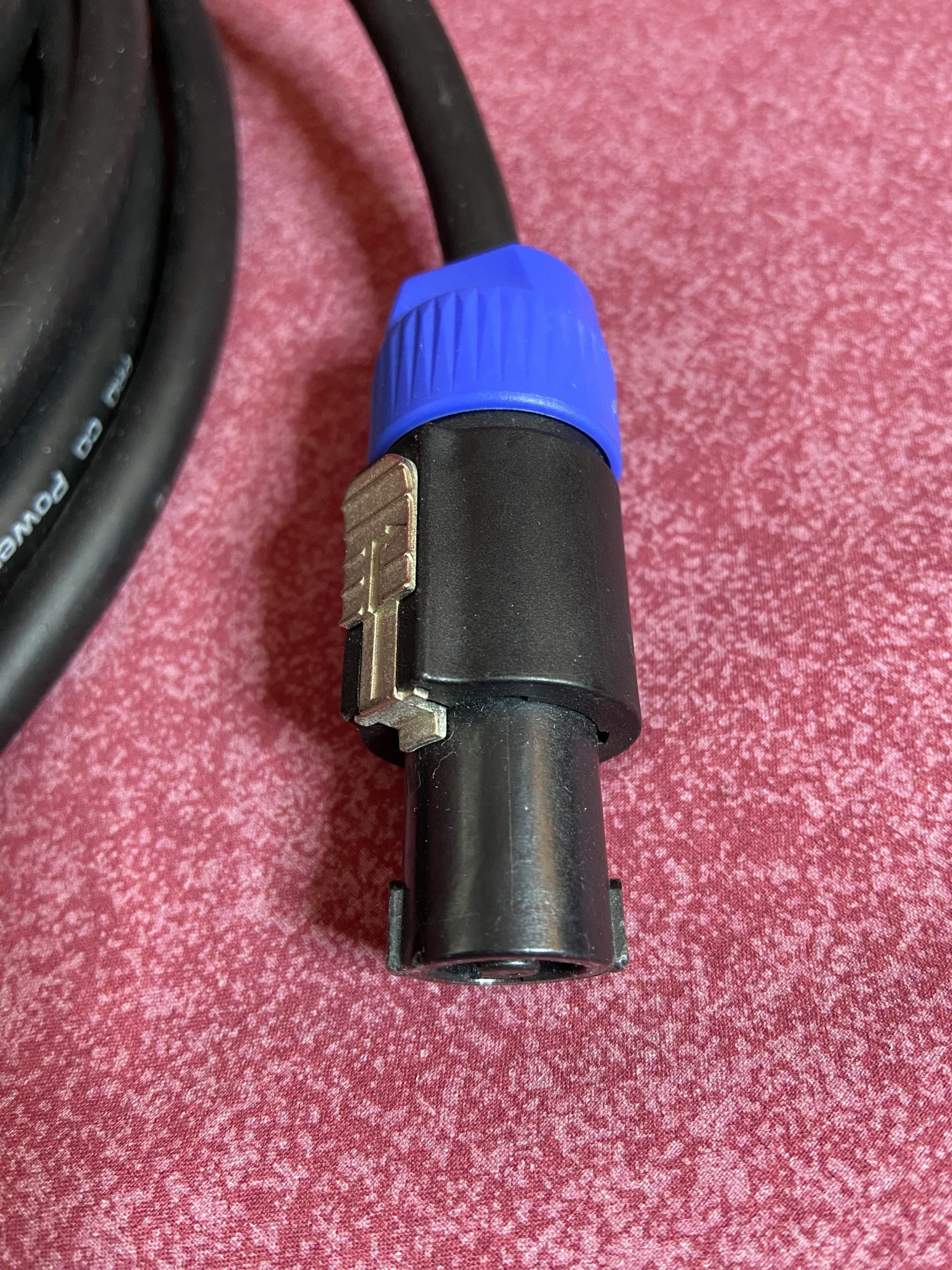
Passive systems often use Speakon connectors for speaker cables. Steve La Cerra, writing for Yamaha, stresses that these should be turned and locked in place before use. He also gives an important safety rule for any system: always turn off power amps or powered speakers when making or removing connections. Plugging gear in while it’s on can cause a loud pop that may damage speakers.
Mixer Basics: Channels, Gain, and Aux Sends
A mixer can look intimidating, but it’s mostly the same few controls repeated many times.
Channels. Each input gets its own channel strip, which is a vertical column of controls. One channel handles the lead vocal mic, another the kick drum, another the bass DI, and so on. A bigger band needs more channels, which is why engineers care about your input count.
Gain. At the top of each channel is the gain knob. It sets how strongly the incoming signal enters the mixer. Violet Recording explains that good gain setting means asking each performer to play or sing as loud as they will during the show, then setting the input so it’s strong without clipping (distorting). This is why the engineer asks you to play at real volume during soundcheck. If you play softly and then hit hard during the show, your channel can distort. Once the gains are set, the faders, the sliders at the bottom of each channel, handle the balance between instruments.
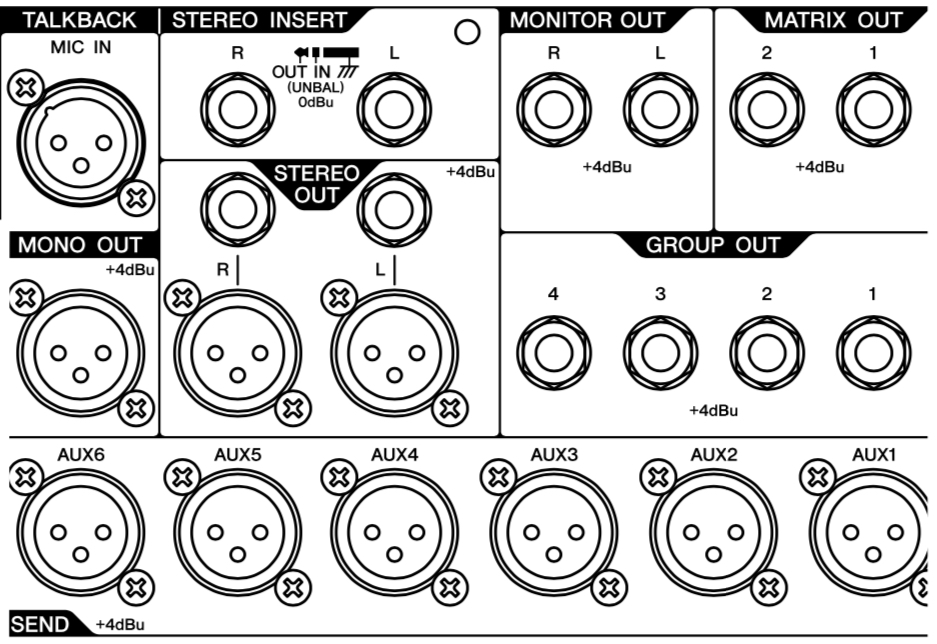
Aux sends. “Aux” is short for auxiliary. Aux sends are extra knobs on each channel that build separate mixes. These mixes are usually the monitor mixes. Aux 1 might feed the singer’s wedge and Aux 2 the drummer’s. Turning up the vocal on Aux 2 adds vocal only to the drummer’s monitor and leaves the audience mix alone. La Cerra notes that monitor auxes are normally set “pre-fader.” That means moving a channel’s main fader for the audience won’t change what you hear on stage.
 Via hub.yamaha.com
The number of aux sends on a mixer sets a hard limit on how many separate monitor mixes are possible.
What to Tell a Rental Company or Venue Before the Show
Give the people supplying your sound clear information early. These details help:
- An input list: every mic and instrument that needs a channel, including which ones need DI boxes
- A stage plot: a simple sketch of where everyone stands. Violet Recording notes that engineers appreciate this and that changeovers get noticeably faster with one.
- How many monitor mixes you need, and who shares a wedge
- Whether anyone uses in-ear monitors
- The style of music: bass-heavy acts may need low-end support, such as a subwoofer
- Who’s running sound: the venue’s engineer, the rental company, or someone in your band
- Timing: load-in, soundcheck, and set times
A short, accurate list saves more soundcheck time than almost anything else.
Sources
Live Sound Guide: PA Systems, Mixing and Monitors for Gigs, Violet Recording Editorial Team, Violet Recording
Live Sound Troubleshooting Tips, Part 1, Steve La Cerra, Yamaha Music (hub.yamaha.com)
The Difference Between Point Source and Line Array Speakers, author not stated, Carvin Audio