Have FireWire Audio Interfaces And An Apple Silicon Mac? You Might Be Able To Use Them

On this page
FireWire Interfaces on Apple Silicon: A Free Driver Brings Some of Them Back
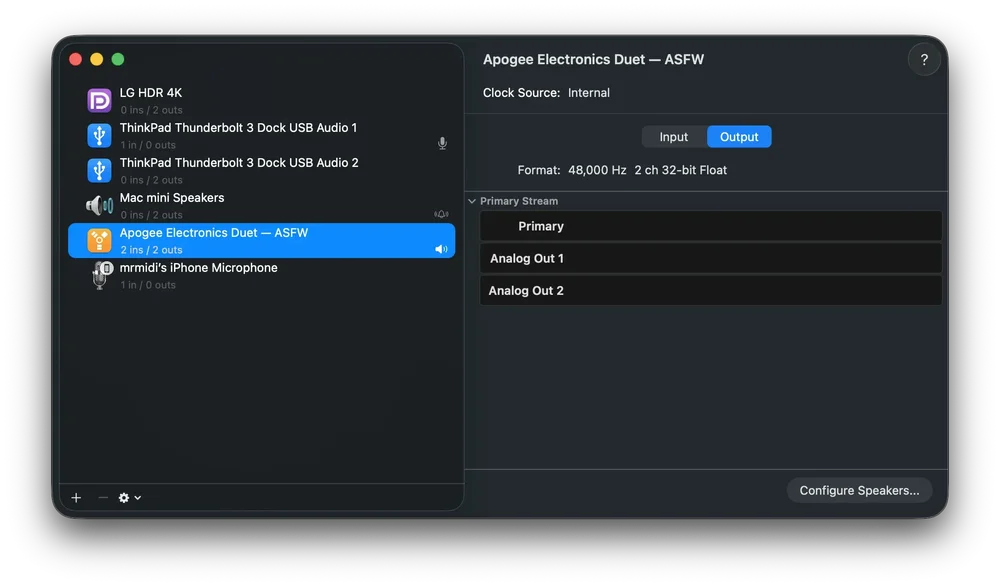
Apple’s latest macOS left a lot of perfectly good FireWire interfaces without a way to connect. A free, open-source driver called ASFireWire now makes many of them show up again in Audio MIDI Setup on Apple Silicon Macs. It is signed and notarised (Apple has checked and approved it as a distributed app), and you don’t have to turn off System Integrity Protection (SIP), the macOS security feature that guards system files. Two questions matter: is your interface supported, and can you trust the driver near anything important?
How FireWire Audio Got Cut Off
Apple retired FireWire in two steps. macOS Ventura removed the FireWire Core Audio driver. That broke “class-compliant” devices, which rely on a driver built into the operating system, and the Apogee Duet was one casualty. Interfaces that shipped with their own drivers kept going through Sequoia. Tahoe then took out the FireWire stack altogether, and RME confirmed that the Fireface 400 and 800 could no longer be used.
Until now, the usual advice was to keep an older Mac around. ASFireWire offers another route. Developer Aleksandr Shabelnikov rebuilt the audio-relevant parts of the FireWire stack using Apple’s DriverKit frameworks, which run outside the kernel, the core of the operating system. It follows a pattern we’ve seen before, when Eleven Rack owners got an Apple Silicon driver and editor from independent developers within weeks.
Modern tooling plays a part in how the project is built. The repository includes instruction files for AI coding assistants and an optional control plane that lets AI agents inspect the driver’s state. A long list of contributors also test on real hardware.
 Via production-expert.com
Who Should Try It, and Who Should Wait
If you have a FireWire interface sitting in a cupboard and a spare Apple Silicon Mac, this is aimed at you. A revived Saffire or Venice makes sense in a second room, an overdub station, a teaching rig or a setup for your own projects.
Budget builders have the most to gain. The Midas Venice F32 offers 32 channels in each direction, which is a lot of I/O for hardware that now sells cheaply.
We haven’t tested ASFireWire ourselves, so we can’t speak to crashes, restarts or dropouts. It is, however, attracting plenty of fans in the audio community.
If you deliver work to broadcasters, labels or clients on a deadline, keep it off your main machine. The developer says not to use it on a production Mac or during paid sessions, because even a low-level driver running outside the kernel can still crash macOS or cause a kernel panic (the system-wide freeze that forces a restart).
Which Interfaces Work Right Now
Compatibility depends on the protocol a device speaks, so the project sorts hardware by chipset. It also separates devices that have been tested from those that are merely switched on in the code.
Confirmed working by the maintainer:
- Apogee Duet FireWire
- Terratec Phase 88 Rack
- Focusrite Saffire Pro 24 DSP
- PreSonus StudioLive 16.0.2, with 16 channels in each direction
- Midas Venice F32, with full 32 by 32 duplex (simultaneous input and output)
On the Venice, switching the sample rate in your DAW between 44.1 and 48 kHz reprograms the desk live, with no need to reconnect.
Added by contributors:
- The third-generation Avid Mbox Pro, good news for Pro Tools users who kept one
- The Midas Venice F24, which a contributor has used in real Pro Tools sessions
Version 0.6.0, published on 20 October, added support for Prism Sound’s Orpheus, MIDI on DICE-based devices, device controls, and updates for the RME Fireface 400 and 800. The Fireface models run at 48 kHz in duplex, but they still need reports from owners because the developer doesn’t have the hardware.
Recognised but not yet passing audio:
- Saffire Pro 26
- Saffire Pro 40
- Liquid Saffire 56
- The larger StudioLive 16.4.2, 24.4.2 and 32.4.2 mixers
Each of these needs an owner to supply a register capture, a record of how the device talks to the computer, before support can be added. MOTU and Mackie support is being reworked and needs testing again. Digidesign’s 002 and 003 don’t appear in any test report yet.
What About Performance?
The early numbers look respectable. The developer reports a round-trip latency (the delay from input to output) of 7.021 ms at 48 kHz on the Saffire Pro 24 DSP, and the driver’s own measurement matches Oblique Audio’s RTL Utility.
What’s missing is the buffer size and the computer models used, so check those before deciding whether the figure suits your work. The site mentions testing on a 2020 M1 MacBook Air and an M4 Mac mini, but since this is a community project we can’t confirm that’s the standard test spec. The documentation covers 44.1 and 48 kHz, and we haven’t seen reports of 88.2 or 96 kHz operation.
 Via production-expert.com
What You Need to Connect and Install
The reference setup looks like this:
- An Apple Silicon Mac running macOS 26 or later
- Apple’s Thunderbolt 3 to Thunderbolt 2 adapter
- Apple’s Thunderbolt to FireWire 800 adapter
- A FireWire 400 to 800 cable, if your interface has the older connector
Apple has discontinued both adapters, so expect to buy them second-hand.
PCIe FireWire cards in a Mac Pro or Thunderbolt chassis take more effort. The driver currently recognises the controller inside Apple’s adapter, so other chipsets need their IDs added before the driver will even start.
Installation comes as a signed DMG (a standard Mac disk image):
- Remove any earlier build.
- Open the ASFW app.
- Install the driver extension.
- Approve it in System Settings under Login Items & Extensions.
Earlier builds on GitHub required SIP to be disabled. The hosted build doesn’t, and that’s the one to use.
Is It Worth the Effort?
The software is free, so your costs are the adapters and your time. If your interface is on the confirmed list and you have a non-critical Mac to run it on, the case is strong. You get working I/O from hardware you already own, and the worst a failure costs you is a restart.
If your interface is enabled but untested, treat your first session as an experiment and send the results to the project. Owner reports are how devices move onto the confirmed list. On a client-facing system, wait until the project calls itself stable before letting it near a session.
Price: Free, open source under the Apache 2.0 licence.
Availability: Version 0.6.0 build 33, available now for Apple Silicon Macs running macOS 26 or later.
Sources
Have FireWire Audio Interfaces And An Apple Silicon Mac? You Might Be Able To Use Them, www.production-expert.com