Pulsar Audio Releases DigiTape, A Free Early Digital Tape Plugin

On this page
DigiTape: A Free Plugin Modeled on Early Digital Tape Processing
Most tape plugins aim to copy a real tape machine as faithfully as possible. Pulsar Audio’s new DigiTape goes the other way. It is built on two early digital tape algorithms from the 2000s, written when computers had little processing power to spare, and it is free. Here is what it does, what the free release includes, and how you might put it to work.
The Idea Behind It
Pulsar Audio presents DigiTape as a tribute to the engineers who wrote those early algorithms. In their view, those designers weren’t trying to match a specific reference tape deck. They were chasing the qualities they valued in tape, and the results have a character that today’s more accurate models don’t reproduce.
That makes DigiTape an alternative to the realistic tape emulations that dominate the category. If you already own a plugin that models a specific machine, this isn’t meant to replace it. It’s a different flavor of “tape,” and you should judge it by ear rather than by how closely it matches hardware.
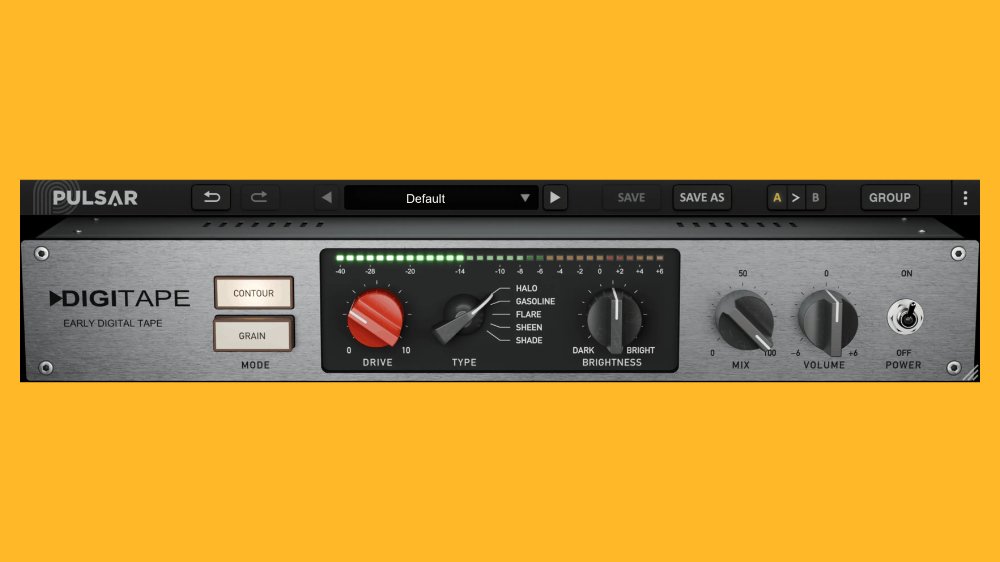 Via production-expert.com
The Two Algorithms: CONTOUR and GRAIN
The plugin includes two algorithms that complement each other. They work from opposite ends of the spectrum.
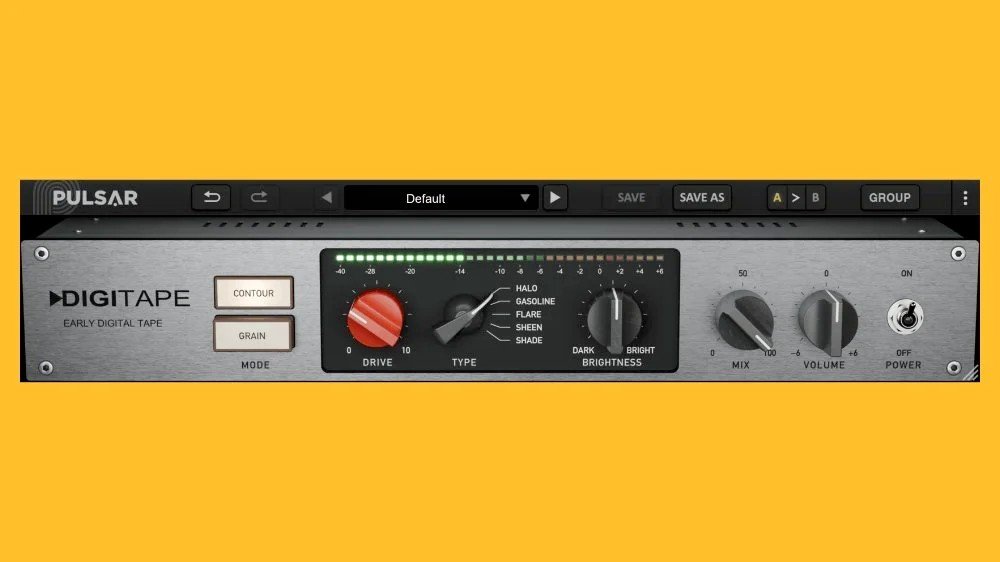
CONTOUR works on the top end. It compresses and saturates the highs, and it rounds off transients. A transient is the sharp initial spike of a sound, like the stick hitting a snare or a pick striking a string. Rounding those spikes softens the attack and tames harshness. Saturation, in simple terms, is gentle distortion that adds harmonics (extra overtones) and levels off peaks the way driven tape does.
GRAIN goes the other direction. It saturates the lows and mids while reducing the original highs. The harmonics generated by that low and mid saturation then enrich the top end and add body. The highs you hear afterward are partly the product of the processing rather than the untouched originals.
Pulsar Audio describes the two together as covering the broad approaches those early processors took. In practice, you can think of CONTOUR as the “tame and smooth the top” option and GRAIN as the “thicken the body and rebuild the top from harmonics” option.
What You Get for Free
The free release is fairly complete, with no stripped-down feature set. Here is the full list:
- Five tape Types. Each has its own saturation curve (how the signal gets bent as it’s pushed harder) and tonal balance.
- Drive with automatic gain compensation. Drive controls how hard you push the signal into saturation. Gain compensation adjusts the output level to offset the change, so the processed and unprocessed versions stay at comparable loudness. That matters because louder almost always sounds better to our ears, which can fool you into thinking a setting is an improvement when it’s just more volume.
- Oversampling. This option runs the processing at a higher internal sample rate. Oversampling is commonly used with saturation to keep unwanted artifacts under control, at the cost of more CPU. Pulsar Audio simply lists it as a feature, so try it on and off and listen.
- Instance grouping. You can link multiple copies of the plugin so they move together, which helps when you want a consistent tape feel across many tracks.
- More than 20 presets. They’re a useful starting point, especially for learning what each algorithm and Type does.
- Low CPU consumption. The company notes this, which suits the plugin’s origins in an era of limited processing power. It should make DigiTape easy to put on many tracks.
- No iLok required. An iLok is a licensing system that ties software authorization to an account or a physical key. You don’t need one here.
 Photo by David Maat / Pexels
Getting It Installed
Pricing is free and the plugin is available now. The licensing steps are simple:
- Go to the Pulsar Audio website and fill out the form for DigiTape.
- You’ll receive a licence code.
- Enter that code directly in the plugin to activate it.
Check Pulsar Audio’s page for details such as supported plugin formats and system requirements, since those aren’t covered here.
Putting DigiTape to Work
The following are suggestions for getting the most out of it, rather than rules from Pulsar Audio.
Start with presets, then strip them back. With over 20 presets, the quickest way to learn the plugin is to cycle through them on a track you know well. When one gets close, note which algorithm and Type it uses, then adjust from there.
Compare the two algorithms on the same material. Try CONTOUR and GRAIN on the same track, using the same Type and similar Drive. Because they behave so differently, the contrast teaches you more than any description. Try CONTOUR on something bright or spiky, like a hi-hat loop, a harsh vocal, or a bright synth, where softening the top end and rounding transients might help. Try GRAIN on something that feels thin, where added low and mid saturation and the harmonics it pushes into the highs might help it feel fuller.
Let gain compensation do its job. With automatic gain compensation on Drive, you can raise the amount of saturation without a big jump in level, which makes it easier to decide if you actually like the tone. Still, switch the plugin in and out and check that the levels feel matched before you commit.
Test oversampling on and off. Switch oversampling on and off at your chosen Drive setting and listen for any difference. If you can’t hear one on a particular source, you can leave it off and save a bit of CPU. If you can, leave it on.
Use grouping for consistency. If you want a whole drum kit or a group of guitar tracks to share the same tape character, load an instance on each and link them with instance grouping. Adjusting one then adjusts them all, so you can shape the overall sound without chasing settings across the session.
Don’t expect hardware accuracy. DigiTape’s appeal lies in its early-digital character. Use it when you want that coloration, and reach for a more realistic model when you want a convincing copy of a particular deck.
The Takeaway
DigiTape gives you two contrasting takes on early digital tape processing, five tape Types, practical controls like Drive with gain compensation and oversampling, and more than 20 presets, all at low CPU cost and without an iLok. It’s free. If you’re curious about a rougher, more characterful approach to tape saturation, filling out the form and trying it costs you nothing.
Sources
Pulsar Audio Releases DigiTape, A Free Early Digital Tape Plugin, www.production-expert.com